Posts

Integrate your GIT repository with Visual Studio 2015

Image
  You can now easily use visual studio with your solution in GIT. You can Commi, pull, push ans run all source control commands with in your favourite IDE visual studio. You dont need to use any third party tools for that. Integration in so much easy just new steps. 1. Visual Studio-> Team-> Manage Connections 2. Then you can see team explorer 3. Under Local GIT repositories Click on clone in there on first text box enter your GIT repository URL and the the second one add the local path and then click clone then It will promted to enter your credentails/ It will download the source code from GIT with source control binding. After that you can see all source control commands related GIT available in your visual studio. I .Commit your changes locally after you done with the changes when you right click on a file , project or solution you can find the Commit option as follows. This will commit your changes to local repository. II .Sync your code with server code Be...

Get rid of usafe tag on angular url

  Issue : I recently wanted to use html sms tag in my mobile web site. In the site I have used angual binding to dynamically bind the sms url as follows <a id="lnk_sms" href="{{sms_Link}}"  class="sms-button social-media-button" alt="SMS" style="display:none">SMS</a>   href value is something like :- 'sms:?body=bodyText’ when I run the application agular keep adding a unsafe prefix infront of the url and sms functionality wasn’t working. <a id="lnk_sms" href="'unsafe:sms:?body=bodyText’"  class="sms-button social-media-button" alt="SMS" style="display:none">SMS</a> After spending hours I was able to find the problem and soltion Problem : Only http , https , ftp and mailto are enabled by default. Angular will prefix a non-whitelisted URL with unsafe: Solution : You need to explicitly add URL protocols to Angular's whitelist using a regular ...

Share you link in Social Media

Image
Technorati Tags: C# , Asp.net If you want to a share a link in you web app there are plenty of options available. Recently I got a requirement to share a link , which is browsed through mobile. We have provided the following options to the users. 1. SMS 2. Twitter 3. LinkedIn 4. FaceBook 5. Viber Following points gives you how to add the functionality to your site easily.   1. SMS For this you have to just put the following HTML tag in to you application which is accessed via mobile. This will open the sms app in user’s mobile pre populated with the content which you have stated. <a href="sms:/* phone number here */?body=/* body text here */">Link</a> If you want it to work on iOS, you need this: <a href="sms:/* phone number here */;body=/* body text here */">Link</a> Apparently iOS8 had to go and change things on us, so thanks to some of the other commenters/responders, there's a new style for iOS: <a href="sms:/...

Explicitly freeing memory in c#

Recently I wrote a program which loads some CSV files in to DataTables and do some processing. These files are in large size and have nearly 1 million rows. When I load first file in to data table it works fine. But then I load the second file I get a “Out of Memory exception” even though first I make the previously loaded datatable to null. After searching for hours I found the following solution which solved my issue. var sourceDataTable = DataParserHelper .GetDataTableFromCsv( @"F:\FileSplitter\Data\5263\property_finance.csv" );                    sourceDataTable.Clear();           sourceDataTable.Dispose();           sourceDataTable = null ;                       GC .Collect();           GC .WaitForFullGCComplete();           GC .WaitForPendingFinalizers();   if you make the datatable null what happens is it frees the Datatable from the rows and columns. But actually those rows and columns retained in the memory and those are not rea...

Sending Emails using SendGrid in C#.net

SendGrid has been built from the ground up as an API company. It is built to serve developers and make it easy to send email no matter your environment. You can send email over SMTP or HTTP, and even use one of it’s official client libraries. In just a few minutes, you can send your first email and millions more. It has different pricing plans for you , so you can select as you want. There is a free plan to which you can send up to 12,000 emails per month for free. For more details about pricing visit here 1. Create an account in SendGrid 2. Create a Console Application and add the following nuget package. SendGrid 5.1.0 3. Create a email template in SendGrid. 4. In the following example I’m loading some user information saved in a CSV file and then send password information for those users. Following is the template I have created for that in SendGrid. In the template I have used “{{}}” to specify the tags. You can use what ever the tab you want but make sure you use the same ta...

Point in Time Restore in Azure SQL Database

Image
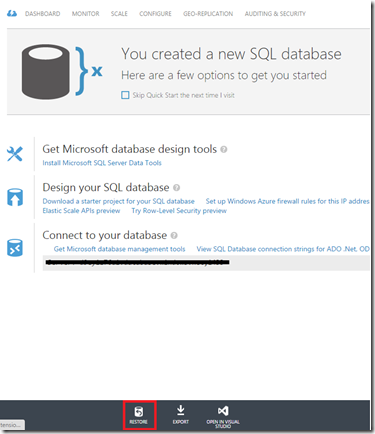
With new Basic, Standard and Premium Service Tiers , you get the new improved facility of “Point in Time Restore”. Which is, it provides you zero-cost automatic backup system. You only incur additional cost if you use the restore capability. The new database created by restore is charged at normal database rates. Together, the automated backup system and point-in-time restore provide a zero-cost, zero-admin way to protect databases from accidental corruption or deletion, whatever the cause. Period that backups retain will based on the service tier. Basic Tier :- 7 Days Standard Tier :- 14 Days Premium Tier :- 35 Days   Restoring a Live Database to a Point in Time Using Azure management portal you can easily. Go to the Database which you want to restore. Then Click on the “Restore” Button in the bottom bar. You will be prompted for a new database name and offered a slider control to pick the restore point within the retention period. Alternatively, you can manually enter th...

Calling Async Call from Main()

This is a small code which shows different ways of calling an async method inside Main Following is my sample method. public async Task < int >SampleMethod()      {          await Task .Delay(5000);          int answer = 21 * 2;          return answer;      }   1. Using  GetAwaiter()   static void Main( string [] args)      {          SampleMethod().GetAwaiter().OnCompleted(() => {      Console .WriteLine( "finished" ); });          Console .ReadKey();      }   2. Using  Wait() static void Main( string [] args)      {          SampleMethod().Wait();      }   Hope this helps,